Brand voice
Let AI write your surveys in your organization’s voice
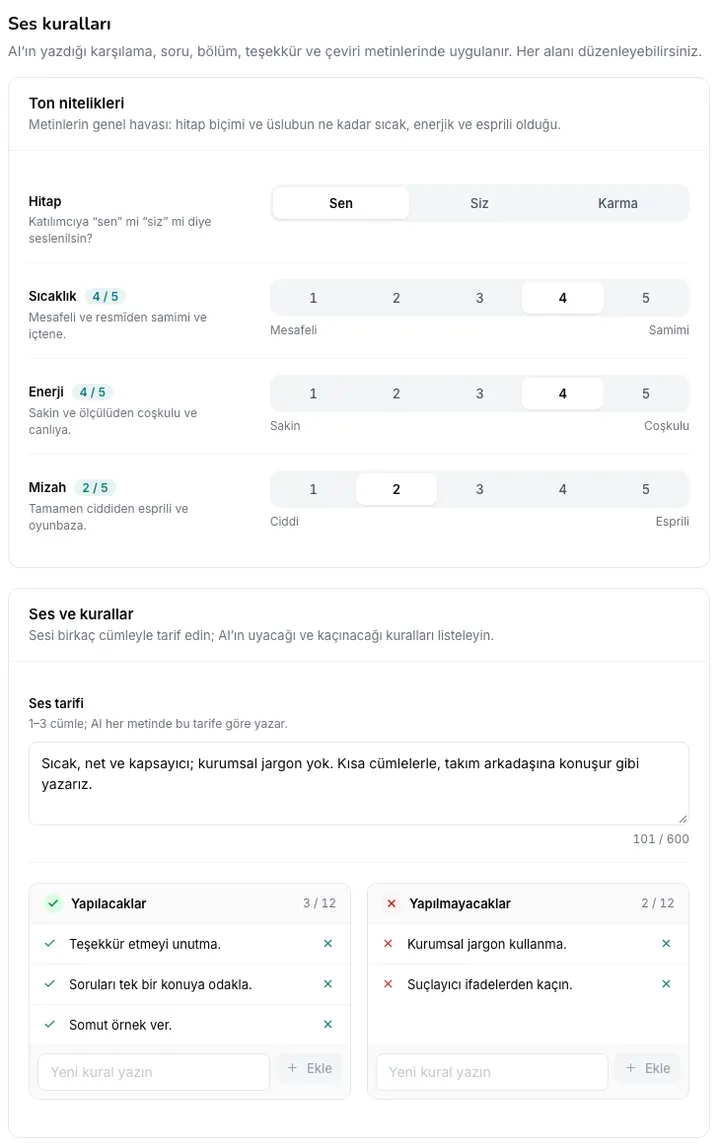
Describe your brand in a few paragraphs, and Survai turns that description into editable voice rules: form of address, warmth, dos and don’ts, preferred words. The rules are applied to every piece of text AI writes for participants; if needed, define a different voice for a single survey.
Screens are illustrative; data is sample data.
Voice rules
Turn your tone into clear, editable rules
- Create the rules with AI or write them by hand
- When you regenerate, you compare and approve the changes field by field
- Rules affect no survey until they are saved
In all AI-written text
The same tone, from draft to translation
- In translation, the form of address is adapted to the target language (e.g. formal “you” → Sie, usted, Вы)
- Brand voice sets only the tone; privacy rules, question counts and text limits stay the same
- When the organization voice is updated, surveys using the organization default are updated too
Highlights
To manage your brand voice
Per-survey voice
Copy and edit the organization voice for a survey, or turn brand voice off for that survey. On Starter and above.
Voice versions
Each save creates a new version; load an older version into the editor to roll back.
Personal data is masked
Email addresses and phone numbers in your description are masked before being sent to the model.
On-premises too
Works with your own OpenAI-compatible model server; if AI is turned off, you can write and save the rules by hand.
FAQ
Which plans include brand voice?
An organization-wide brand voice can be defined on every plan, including Free, and is applied to all surveys; generating the rules with AI uses your plan’s monthly AI credits. Defining a voice specific to a single survey is included in Starter and above.
Does it also apply to invitation emails and analysis text?
No. Brand voice applies to the survey text AI writes for participants. Invitation and reminder emails, as well as internal analysis text such as Ask AI and Explain, are out of scope.
Let’s see together how Survai fits your organization
Tell us about your use case, and in a 30-minute call we’ll walk through the survey, reporting and deployment options that suit you.
- A demo built around your scenarios
- Hosting in the EU (Azure)
- Tools that support your GDPR obligations